AssetEditor is distributed from the GitHub releases page. Download the latest release from GitHub Releases.
AssetEditor_versionXX.rar from the release assets. Do not download the source code archive.
AssetEditor_versionXX.rar.
Place the extracted application somewhere you have write access, for example your Desktop or inside
C:\Users\YourUserName.
AssetEditor also creates a user data folder at C:\Users\YourUserName\AssetEditor.
This folder is used for settings and other files created by the tool.
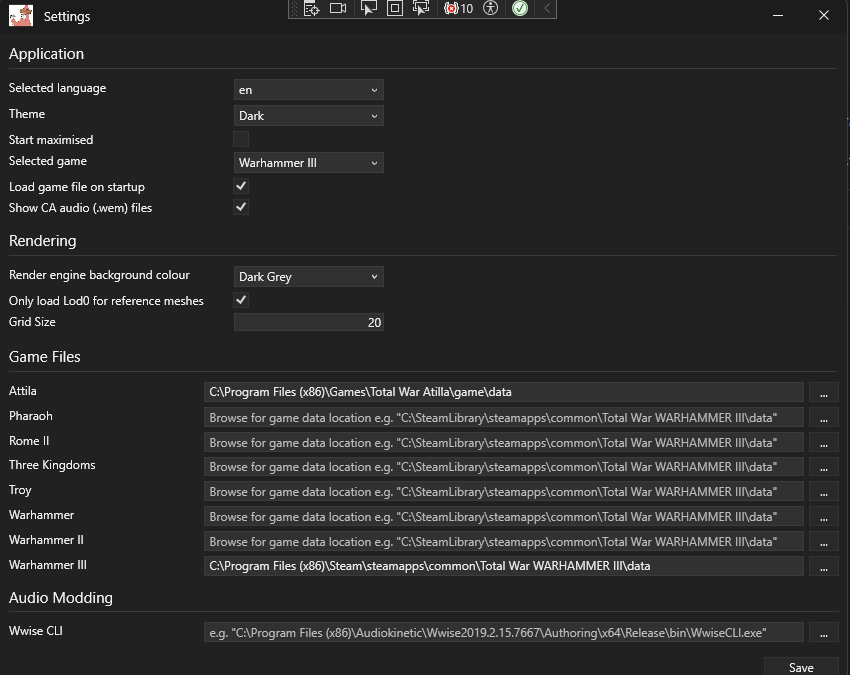
When AssetEditor starts for the first time, the settings window is shown automatically. Choose the game you want to work with and fill in the path to where that game is installed.
If the wrong game or installation path is selected, parts of the editor may not work as expected.